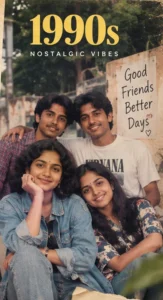
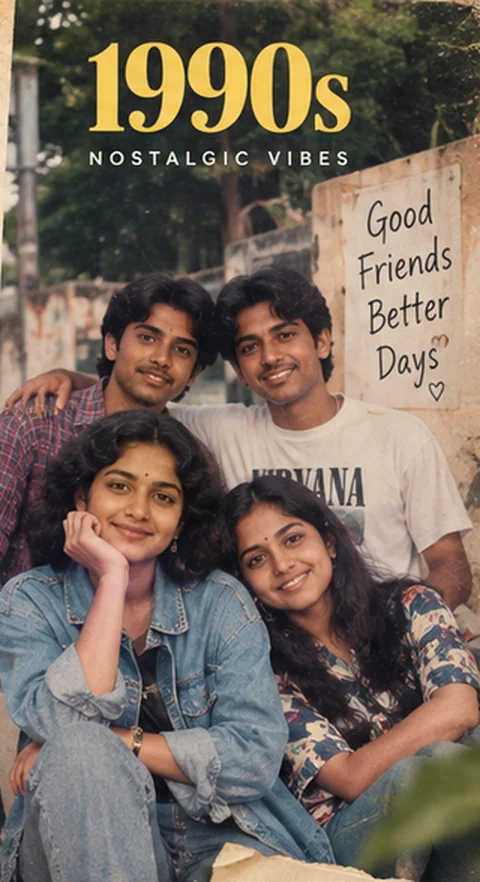
This 1990s office portrait AI prompt turns an ordinary photo into an authentic 1990s office portrait set in Kerala or South India. It keeps your real face and identity, then rebuilds the clothes, hairstyles, props, location and film look so the result feels like a genuine photograph from the 1990s, not a modern picture with a vintage filter.
Copy the prompt, upload your photo to your favourite AI image tool and you will have a nostalgic, share-worthy image in under a minute. It is part of our collection of 400 retro AI image prompts covering the 1960s, 1970s, 1980s and 1990s.
Table of Contents
The 1990s Office Portrait AI prompt
Use the copy button at the top of this page, or select the full text below. Paste it together with your photo:
Transform the uploaded photo into an authentic 1990s office portrait in Kerala or South India. Preserve the recognizable facial identity, natural facial proportions and age of every person; do not replace the people with different faces. Recreate a professional portrait inside a period office. Use 1990s clothing, hairstyles, architecture, vehicles and household objects. Use authentic 1990s film photography, with slightly warm colors, natural flash, fine 35mm grain and nostalgic family-album texture. Keep expressions natural, skin texture realistic, composition believable and props historically appropriate. Make the result look like a real photograph from that decade, not a modern image with a vintage filter. Avoid smartphones, modern cars, LED lighting, contemporary furniture, current logos, modern clothing and digital-looking skin. No text, captions or watermarks.
What This Prompt Creates
This 1990s office portrait AI prompt asks the AI to recreate a professional portrait inside a period office. Every person in your photo keeps their recognisable face, natural proportions and age, while the scene around them is rebuilt with 1990s details. The final image uses slightly warm colours, natural on-camera flash, fine 35mm grain and a nostalgic family-album texture, so it looks like it came straight out of an old family album.
The overall mood is carefree, friendly and full of nostalgia, like prints collected after a film roll was developed. It works beautifully for profile pictures, anniversary surprises, family WhatsApp groups, Instagram posts and nostalgic gifts for parents and grandparents.
1990s Style Guide for Realistic Results
Understanding what made the 1990s visually unique helps you judge the result and refine it. These are the details the 1990s office portrait AI prompt is designed to capture:
- Clothing: denim jackets, loose checked shirts, baggy jeans, churidars, printed tops and plain T-shirts.
- Hairstyles: middle-parted and layered hair, bouncy curls and relaxed everyday styles.
- Props and vehicles: Maruti Zen and Hero Honda motorcycles, landline phones, STD booths, Walkmans, VCRs and point-and-shoot film cameras.
- Locations: college campuses, friends' hangouts, cable-TV living rooms, bakeries and hill-station trips.
- Film look: slightly warm colours, natural on-camera flash, fine 35mm grain and a nostalgic family-album texture.
If any of these elements are missing in your first result, ask the AI to add them in a follow-up message, for example: “Make the clothing more typical of the 1990s in Kerala”.
Why 1990s Photos Look Different
The 1990s were the golden age of point-and-shoot film cameras and 36-exposure rolls. Photos were taken casually with friends, at weddings, on college trips and at home, usually with direct flash. Colours were natural but slightly warm, skin tones were soft and prints had fine grain. Relaxed poses, candid smiles and everyday locations are what make 1990s pictures feel so personal and nostalgic.
The 1990s office portrait AI prompt builds these characteristics into every instruction, so the AI produces a believable photograph instead of a modern image with a filter on top.
Who Is This Prompt For?
- Families who want a nostalgic 1990s version of a recent get-together.
- Couples planning an anniversary surprise or a save-the-date with a vintage twist.
- Content creators looking for eye-catching retro posts for Instagram, Facebook and YouTube.
- Designers and photographers who need quick mood boards for period-themed shoots.
- Anyone curious to see how they would have looked in the 1990s.
How to Use This Prompt
- Choose a clear, well-lit photo where every face is visible and not blurred.
- Open an AI image tool that supports photo uploads, such as ChatGPT or Google Gemini.
- Upload your photo and paste the full 1990s office portrait AI prompt.
- Generate the image and compare faces carefully with the original photo.
- Refine with short follow-up instructions if you want different clothes, colours or backgrounds.
- Download the final image. For websites, export it as WebP under 100 KB for fast loading.
Best AI Tools for Retro Photos
Identity-preserving photo edits need an AI that can use your upload as a reference. These tools give the most reliable results:
- ChatGPT: excellent at following long, detailed prompts and editing photos through conversation.
- Gemini (Nano Banana): very good at keeping faces consistent and blending scenes naturally.
- Adobe Firefly: useful for commercially safe edits and fine touch-ups.
- Midjourney: great for artistic, cinematic retro scenes using image references.
- Leonardo AI: a flexible option with free daily credits.
You can try the prompt directly on the ChatGPT website, or browse more AI image tools on Shujaz.
Tips for an Authentic 1990s Look
- Use a high-resolution photo; small or compressed images lose facial detail.
- Keep the same number of people as in your original photo for the most natural result.
- If a face changes, reply: “Keep the faces exactly the same as in the uploaded photo.”
- Ask for “more film grain” or “softer colours” if the image looks too clean or digital.
- Remove any modern objects the AI adds, such as phones, modern cars or logos.
- Generate two or three versions and pick the one with the most authentic 1990s feel.
Easy Prompt Variations
Add one of these lines at the end of the 1990s office portrait AI prompt to create a different version of the same scene:
- “Make it a hand-tinted colour photograph instead of plain film colours.”
- “Show a slightly wider frame with more of the 1990s surroundings.”
- “Add gentle creases, soft corner wear and a faded border like an old printed photo.”
- “Change the time of day to golden evening light.”
- “Frame it as a close-up portrait with a softer background.”
Common Mistakes to Avoid
When using any retro prompt, including this 1990s office portrait AI prompt, most disappointing results come from a few avoidable mistakes: using a dark or blurry source photo, shortening the prompt so the AI loses important details, accepting a first result where faces have changed, or mixing styles from different decades. Keep the full prompt, check faces carefully, and refine step by step.
Frequently Asked Questions
More 1990s Retro Prompts
- 1990s Workshop Portrait AI Prompt
- 1990s Family Kitchen AI Prompt
- 1990s Courtyard Family AI Prompt
- 1990s Front Veranda AI Prompt
See all 100 1990s AI image prompts or explore the full retro collection for the 1960s, 1970s, 1980s and 1990s.